Crow Trader Features
UP TO 1.5.5-BETA78 · DESKTOP · SPOT ONLY · YOUR KEYS
Crow Trader is a desktop trading bot for Mac and Windows. It runs on your computer, uses your own exchange account, and trades spot only. This page explains the newest parts of the app in plain words.
Every number below describes how the app works. None of it is a promise of results. Crypto trading carries substantial risk of loss, and Crow Trader is software, not financial advice.
Honest backtests (beta78)
Backtests now compute their numbers the way the bot trades:
- Both fees. Every backtest counts the fee on the buy and the fee on the sell.
- Open at end. A position still open when the test ends is valued at the last price, minus the sell fee.
- Real Max drawdown. Drawdown is measured from the equity curve of the run.
- Saved trade list. Every run saves its list of trades.
- "Trades" counts closed positions. DCA buys count once.
Your old backtests were recalculated once from their saved orders. Runs that had no saved orders keep their old number with the tag "Could not recalculate — re-run". Backtesting → Past backtests lists your runs, with a Re-run button.
A backtest shows how rules behaved on past prices. It does not predict future results.
Optional slippage (beta78)
Slippage means a fill at a slightly worse price than the one you saw. A new switch adds it to your tests:
- The switch is off by default.
- When on, each buy and sell fills about 0.06 % worse.
- It applies to backtests and paper trading only. Live trades are never changed by it.
- Turning it on while a position is open only affects new fills.
Every sell shows why (beta78)
Each sell now records its reason, and the stats break down by reason:
- Gain target · Trailing · Stop-loss · Strategy exit · Sell only · Manual · Grid take-profit · Dust (and Spread trailing for EMA Sniper)
Profit sells never go below your fees. Gain target, trailing take-profit, grid take-profit and EMA Sniper spread trailing will not sell below the price that covers your fees. Stop-loss, Sell only, manual and trend exits are not blocked, so they can still protect you.
Zero-amount dust write-offs no longer count as losses in your stats. The coins stay in your wallet as dust.
Signals on the finished candle (beta78)
Strategy signals are now checked once per finished candle of the card's own time frame: a 1m card every minute, a 15m card every 15 minutes. This works the same in live, paper and backtest. A buy can come up to one candle later than before.
Price exits — gain target, stop-loss, trailing, Sell only and grid take-profit — still check the price every few seconds.
EMA Sniper: spread trailing (beta78)
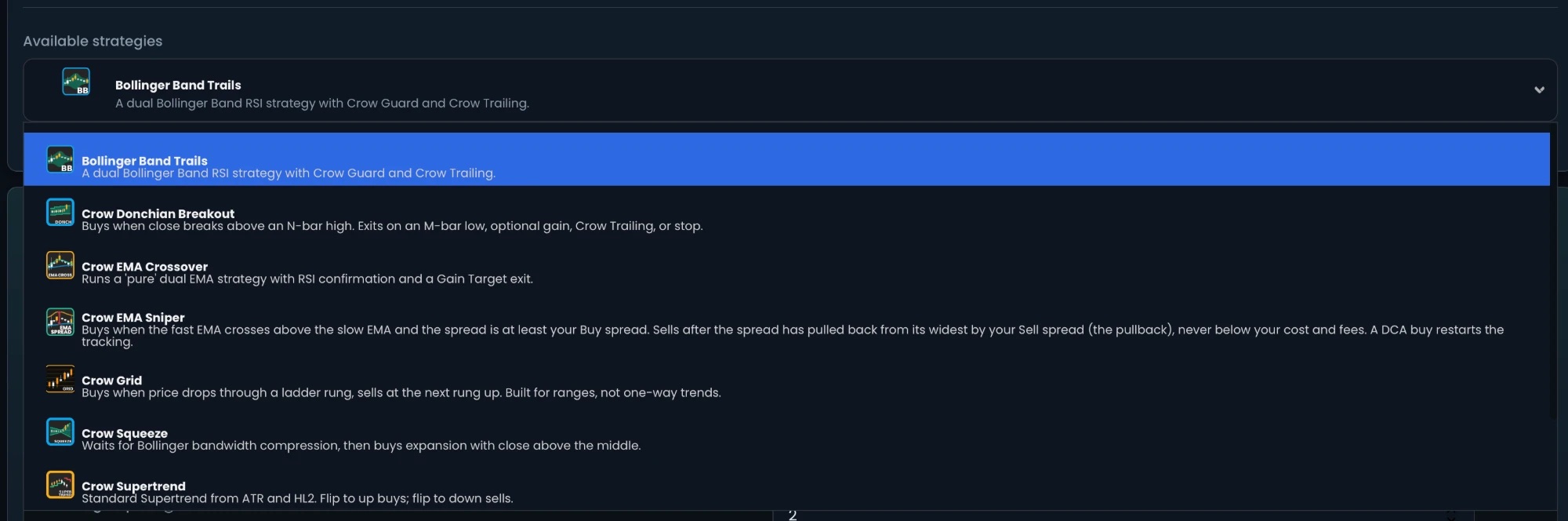
Crow EMA Sniper is now in the strategy list, so you can pick it for new cards and backtests.
- Buys on an EMA cross up, when the spread is at least your Buy spread.
- Sells with "spread trailing": it follows the widest spread since the buy. When the spread pulls back from its widest by your Sell spread amount (default 0.1 %), it sells — and only above fees.
- No gain target for this strategy.
- After a DCA buy, it restarts tracking from that buy.
Other strategy fixes: cooldown now works on EMA Cross, EMA/EMA and EMA Sniper. Grid remembers the step it bought at and sells one step up, never below fees; a grid whose steps cannot cover fees is refused when you save it.
Crow Brain: how your crow thinks (beta77)
Live Trading → Crow Brain shows what each trading card is doing, every tick, in four columns:
- Market data the card sees.
- Indicators with their real values (EMA, RSI and others).
- Selene guards — cooldown, loss limit, Sell only, entry filter and more. Blocked guards show red, fired ones amber.
- The decision: BUY, HOLD or SELL.
Live and paper cards both show (a "Show paper" switch hides paper cards). A profitable sell plays the Crow Quest win moment. Watch mode hides the header, sidebar and footer for streaming; Esc or the X leaves it.
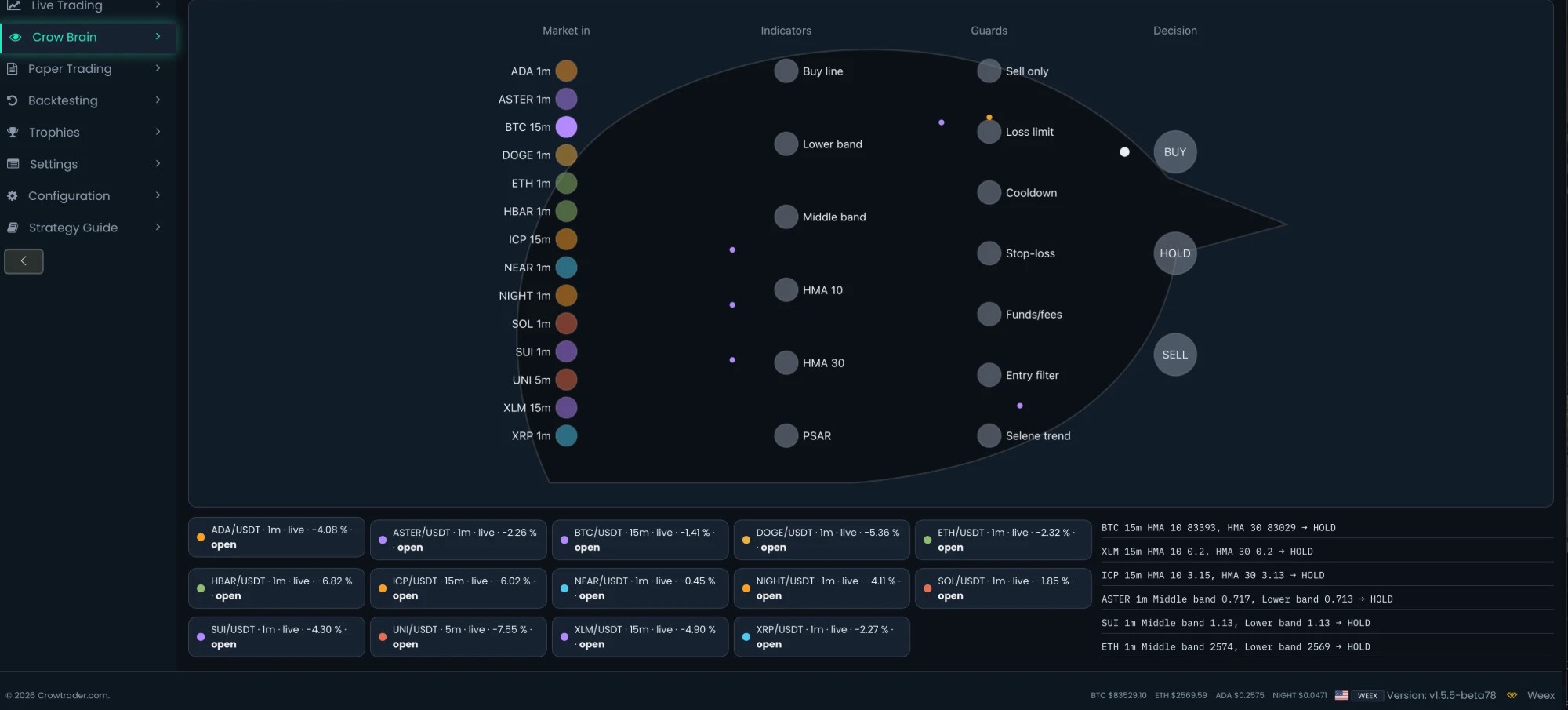
Crow Brain cannot trade. Nothing on the page places, changes or cancels an order. It is not AI and not a prediction: it shows the bot's own rules, with real indicator values and guards, as they run.
Sell only (beta76)
One button next to a card's switch:
- The card stops making new buys (no first entries, no extra buys).
- It keeps selling by the card's own exit rules, and shows "Sell only - waiting to sell at +X %".
- When everything it bought is sold, it switches itself off ("Sold out - off").
- "Buy again" cancels it any time.
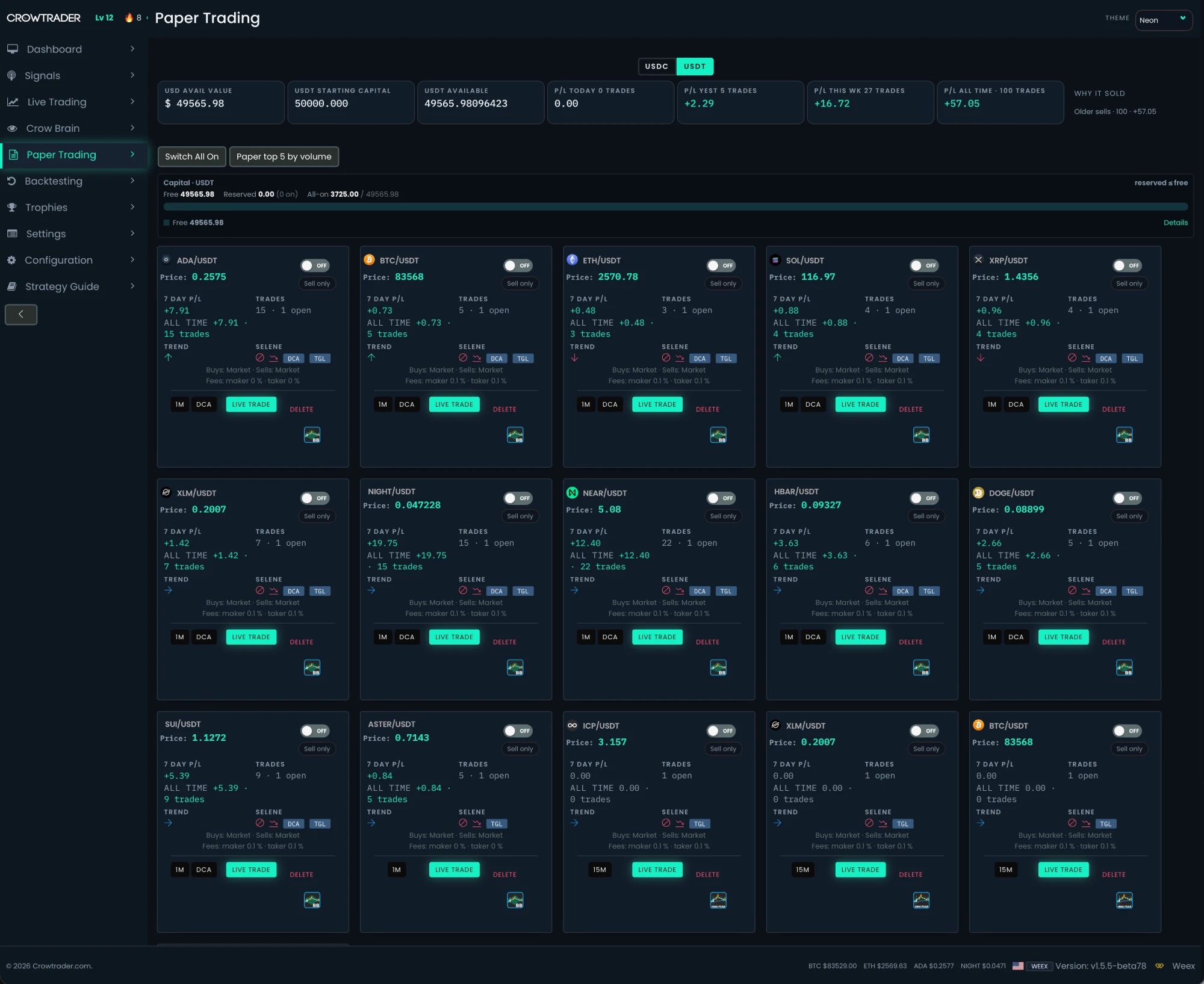
Safe by design: Sell only never places a sell order of its own and never touches coins the bot did not buy. If the loss limit has already paused buys, Sell only does not override it, and "Buy again" checks the loss limit first. Works on live and paper cards. Spot only.
P/L ALL TIME (beta76)
A new P/L ALL TIME box in the stats row, and an ALL TIME line on every card. It counts closed trades only, after fees, per quote currency, with live and paper kept apart.
Trades of cards you delete are kept from 1.5.5-beta76 on. Cards deleted on an older version are not included.
Also in beta76: wallet numbers and the Capital bar refresh about every 30 seconds without reloading, and a failed balance read keeps your last good balance instead of showing 0. The guard system formerly called Sentinel is now named Selene.
Crow Quest and automatic updates (beta75)
Crow Quest turns the bot into a private game: XP from percent gain and smart habits, never from trade count. Paper and live earn the same XP.
Crow Trader also updates itself: it checks every 8 hours, installs with one click, checks the signature first, backs up your data, and rolls back by itself if a new version does not start correctly.
FREQUENTLY ASKED QUESTIONS
- Why did my old backtest numbers change?
- Beta78 recalculated them once from their saved orders, counting both fees and valuing any position still open at the end. Runs without saved orders keep their old number with the tag "Could not recalculate — re-run"; Backtesting → Past backtests has a Re-run button.
- What is slippage and is it on?
- Slippage is a fill at a slightly worse price. The switch is off by default. When on, buys and sells in backtests and paper trading fill about 0.06 % worse. Live trades are never changed by it.
- How does EMA Sniper sell?
- With spread trailing: when the EMA spread pulls back from its widest by your Sell spread amount (default 0.1 %), it sells, and only above fees. EMA Sniper has no gain target.
- Can Crow Brain place trades?
- No. Crow Brain is read-only. Nothing on the page places, changes or cancels an order.
- Is Crow Brain AI?
- No. It shows the bot's own indicator values and Selene guards as the rules run. It is not AI, not a neural network, and not a prediction.
- Can a trading bot guarantee profits?
- No — and any bot that promises profits should worry you. Crypto trading involves substantial risk of loss. Crow Trader gives you paper trading and backtesting so you can measure a strategy honestly before any real money is involved. It is software, not financial advice.
KEEP READING
TRADING BOT GUIDES: crypto trading bot · best crypto trading bot · free crypto trading bot · bitcoin trading bot · automated crypto trading · crypto paper trading · crypto backtesting · ai trading bot · crow quest · crow trader features · changelog · coinbase trading bot · kraken trading bot · kucoin trading bot · binance us trading bot · bitget trading bot · weex trading bot